
01
See current conditions
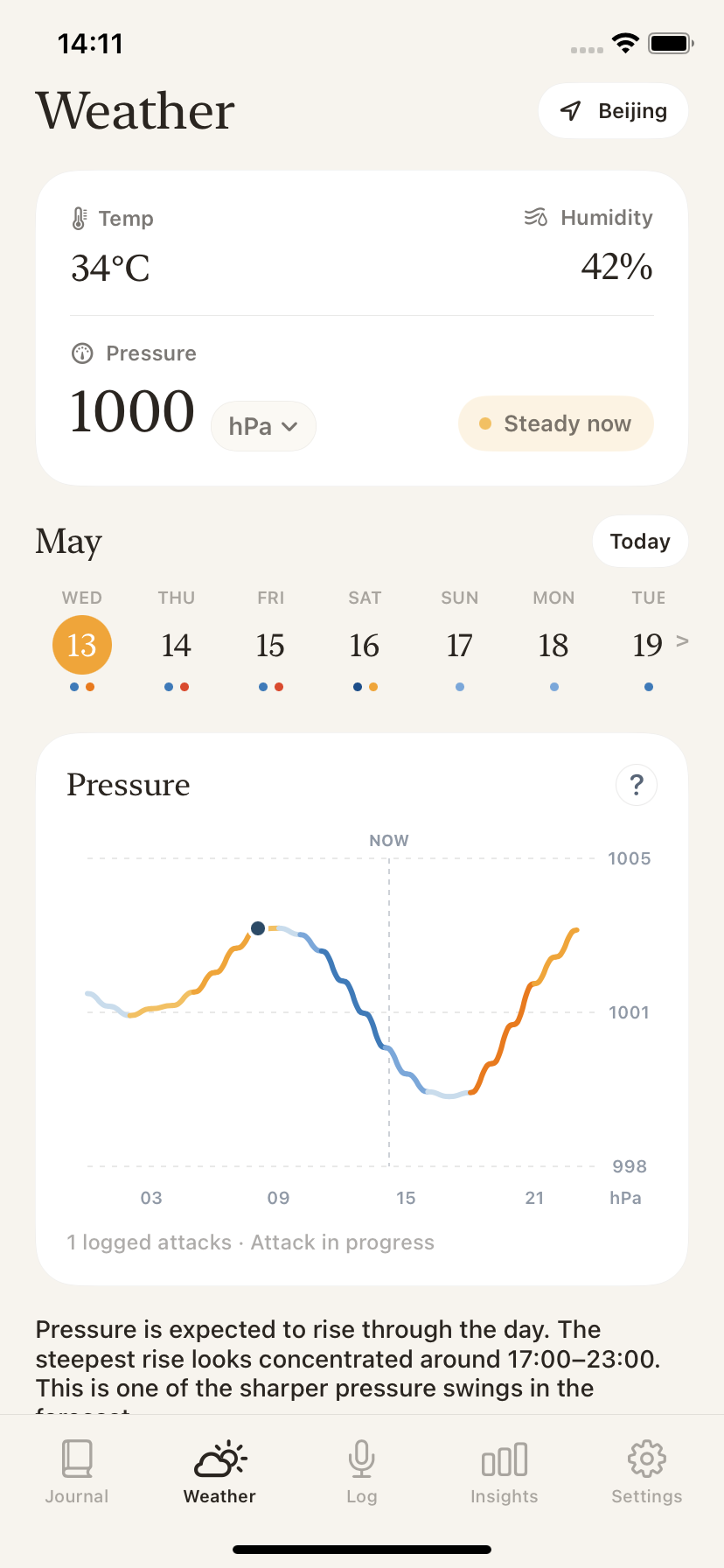
Check local temperature, humidity, and barometric pressure from the Weather tab when you want context for the day.
Barometric pressure migraine tracker
SereneHead shows local pressure, humidity, and temperature alongside your logged attacks, so weather context stays in your migraine journal for later review.
For personal tracking only. SereneHead does not diagnose, predict, prevent, or advise treatment.
Problem
If you notice migraine attacks around storms, pressure swings, heat, or humidity, it can be hard to remember the actual conditions after the day has passed.
SereneHead keeps weather context near the attack history you are already building. The goal is a clearer record for personal review, not a forecast of what your body will do.
SereneHead solution
01
Check local temperature, humidity, and barometric pressure from the Weather tab when you want context for the day.
02
Use the pressure chart to see how pressure moved through the day beside the date you are reviewing.
03
Logged attacks appear near the weather view, making it easier to compare your own notes with the surrounding conditions.
04
Your saved journal can support insights and doctor-ready PDF reports when you want a more complete visit summary.
Weather tracking boundary
SereneHead can help you record and review weather conditions around your own attacks. It does not tell you that pressure caused an attack, predict a future attack, or recommend what to do medically.
How it fits
Use Voice, Quick Log, or Type to save the attack details you can capture in the moment.
Review pressure, temperature, humidity, and the daily pressure chart around the date you logged.
Use the journal and reports as discussion material for yourself or your clinician, without treating the app as medical advice.
FAQ
Yes. SereneHead includes a Weather tab with local pressure, temperature, humidity, and a pressure chart that you can review alongside logged attacks.
No. SereneHead is a personal tracking app. It does not predict migraine attacks or tell you that weather caused an attack.
You can review local barometric pressure, temperature, humidity, and pressure movement for the day in the Weather tab.
Saved migraine entries can be part of your SereneHead history and doctor-ready PDF reports. Weather context can help make that history easier to discuss.
Yes. SereneHead is built for iPhone and is distributed through the App Store.
No. SereneHead helps you keep a reviewable personal record. It does not provide medical advice, diagnosis, prevention guidance, or treatment recommendations.